Bastion Circuit: Your server. Your defense. Security Center brings server status, events and active countermeasures into one place. Watch your own machine or an authorized collective server, launch a Lockdown and defend the control node against an intrusion. Add Sentinel by Vesper Signal for automatic detection and extra time to respond.
Set up in five steps
- Open the App Store and select the server the subscription will protect.
- Select your own bank account with enough game money. Security Center normally costs $2,000 per week, with Sentinel adding $5,000. The store shows the current offer.
- Subscribe and download Security Center. A subscription does not replace the download.
- Start an Antivirus in Files & Software to use Lockdown. Running a cleanup scan alone does not start persistent protection.
- Open Security Center. If you subscribed to Sentinel, download that module too, run the matching protection software and explicitly choose Start Sentinel.
The app header shows the selected server, Sentinel state, CPU and RAM use, Lockdown and cooldowns. Expand Events for past alerts and Subscription for payment and renewal controls. Alarm refreshes preserve your open sections.
Lockdown: time to defend
A running Antivirus is required. Start lockdown slows ordinary incoming hacks, exploits and foreign virus installations to 20% speed. Your outgoing attacks, uploads and downloads slow down too. Work already completed is preserved. Existing access and installed viruses are not removed.
Antivirus v1.0 gives three minutes of initial protection. Higher versions extend it to five minutes at v5.0. Successfully countering an intrusion can add 30 seconds at a time, up to three extra minutes. Total protection is limited to eight minutes. Automatic Sentinel interceptions and mere distractions do not earn that bonus.
A 20-minute cooldown starts when Lockdown actually ends. Ending it voluntarily, stopping or removing its Antivirus, or losing the control node also triggers the cooldown. Starting a stronger Antivirus during Lockdown does not extend it retroactively.
Intrusion: the tactical break-in
An attacker can try to capture the control node and suppress active defense. This is an additional operation alongside the normal hack. As the attacker, you need your own subscribed and downloaded Security Center, suitable running tools and the required certifications. Complete a port scan of the discovered target, then open its Security Center from Interwebs. The target must have an active security controller.
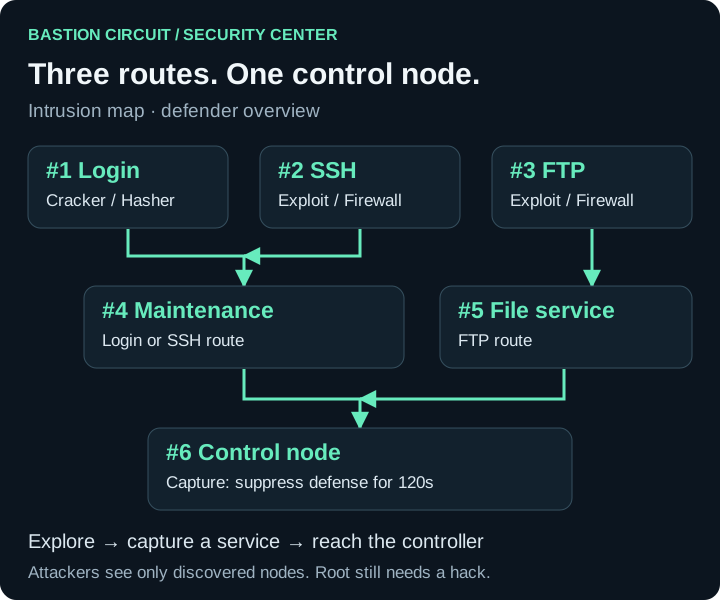
- Login gateway → Maintenance → Control node: Cracker against Hasher.
- SSH → Maintenance → Control node: SSH exploit against Firewall.
- FTP → File service → Control node: FTP exploit against Firewall.
Example attack: Inspect login gateway #1 to reveal the next service. Use Breach to capture #1, then inspect and capture Maintenance #4. You can now attack #6. Seeing a following node does not automatically make it reachable: you must control a preceding service. Alternatively, take the SSH or FTP route. Keep the connection and your tool running.
| Action | Base time | Result |
|---|---|---|
| Inspect node | 10 seconds | Reveals the node and following connections. |
| Breach | 30 seconds | Captures a reachable service. |
| Capture control node | 45 seconds | Suppresses active defense. |
| Decoy | 10 seconds | Produces an initially ambiguous alarm for 30 seconds. |
Breach and control capture become faster or slower according to your tool and the target's protection. CPU load, countermeasures and eligible console bonuses affect the displayed time. Each attacker can run one offensive action at a time. An intrusion ends within ten minutes; the normal hack remains independent.
Responding as the defender
During an intrusion you see your complete network layout and alarms at affected nodes. An alarm may be a real advance or a distraction. Investigate alarm takes ten seconds and reveals which it is. Decide whether to spend that time or protect a service immediately.
- Isolate: After five seconds of preparation, isolates a service for 30 seconds. Advances through it are interrupted and must restart. Your own transfers through that service are affected too. Each node has a 90-second cooldown. You cannot isolate #6.
- Reinforce: After five seconds of preparation, halves enemy intrusion progress at the selected node for 30 seconds. This also works on the control node.
- Lockdown: Additionally slows normal attacks. It is available independently of an active intrusion.
Each defended server has one defensive preparation slot and can maintain one isolation or reinforcement at a time. A new effect cannot replace one still running. Nodes already captured stay captured when a later advance is interrupted.
If #6 falls: Lockdown ends, existing Sentinel pauses are lifted and both protection functions are suppressed for 120 seconds. Existing events and logs remain. Capturing the controller grants no root access; the attacker still needs the normal hack to succeed.
Reading alerts
With running Sentinel, ordinary cracks, exploits and virus installations can trigger alerts too. Nobody needs to attack the control nodes first. A desktop warning shows the target server, time, detected attack type and observed game IP. Detected does not automatically mean intercepted. Open Security Center or the affected server log from that warning. A control-node alarm alone does not reveal an attacker IP.
Subscriptions, resources and collectives
A subscription week lasts seven real days, including time logged out. The chosen account pays renewal; Security Center and Sentinel share one billing date. Adding Sentinel midweek charges only the remaining part of that week. Cancellation takes effect when paid time ends. Canceling the base subscription also stops the add-on renewing. Stopping a program does not cancel its subscription.
Insufficient funds cause no partial charge or debt. Protection expires; successful reactivation starts a new week without charging missed weeks. Agreed prices remain attached to the existing contract. A disk reset removes downloads, not the subscription; downloading again during a valid paid term is free. A round reset ends game-money subscriptions.
Sentinel normally uses 5% CPU and 32 MB RAM. Lockdown reserves another 10% CPU and 32 MB RAM; a running intrusion action requires another 32 MB RAM and CPU time. The protection programs themselves also need resources. Check Task Manager if a service will not start.
Collective members can view status. Authorized admins, co-owners and leadership manage subscriptions and defense, sharing the server's resources and cooldowns. The payment account belongs to an authorized member. Losing that role revokes future payment authorization while preserving paid time. Only collective leadership can trigger emergency shutdown.
Play without a mouse
The GUI and console use the same state. help security lists the actions, including subscription management, confirmations and logs. Use the intrusion and node IDs shown by the game.
| Task | Kali | PowerShell |
|---|---|---|
| Own status | rebels security status | Get-TRSecurity |
| Inspect node | rebels security inspect --intrusion 12 --node 1 | Get-TRSecurityNode -Intrusion 12 -Node 1 |
| Breach node | rebels security breach --intrusion 12 --node 1 | Invoke-TRNodeBreach -Intrusion 12 -Node 1 |
| Isolate service | rebels security isolate --node 1 | Block-TRSecurityNode -Node 1 |
| Own server log | rebels security log | Get-TRSecurityLog |
Both simplified modes accept commands such as security status and security breach --intrusion 12 --node 1. Here 12 is an example ID. Console bonuses shorten eligible work, never cooldowns, protection durations, random chances or reboots. Bots use the same game rules without console bonuses.
When a control is unavailable
No active intrusion: Isolation and reinforcement are waiting for an intrusion. Detecting an ordinary crack alone does not start one. Lockdown can still help.
Not enough RAM: Running programs, protection services and actions share memory. Stop unnecessary services or upgrade RAM. Check that your Antivirus is actually running, rather than only stored on disk.
Last resort: Emergency shutdown remains available through Hardware without a subscription, once every 24 hours. It disconnects sessions, cancels tasks and forces a five-minute reboot. After 60 seconds, assigned external income viruses self-destruct and uncollected earnings are lost. Review the displayed consequences before confirming.